▼ 이전 글
3. 절차적 도심 생성 - Perlin Noise로 경계면 다듬기
▼ 이전 글 2. 절차적 도심 생성 - 가중치 Voronoi를 통한 구역 분할▼ 이전 글 1. 절차적 도심 생성 - 도로 생성■ 도로 생성 실제 도심을 내려다보면 도로가 격자 형태로 나 있고, 그 사이에 생긴 블
hate-errorlog.tistory.com
■ 개요


앞서 나눈 구역 위에 실제 건물을 배치한다. 건물 프리팹은 1x1, 2x3처럼 저마다 크기가 다르므로, 칸을 하나씩 훑으면서 그 자리에 들어갈 수 있는 크기를 골라 빈 구역을 채운다.
■ 건물 프리팹 로드하기
인스펙터에서 타입별·크기별로 프리팹을 일일이 링크할 수도 있지만, 항목이 늘어날수록 잘못 연결하는 실수가 생기기 쉽다.
그래서 프리팹 네이밍 컨벤션을 정하고, 이름만 보고 구역별·크기별로 자동 분류해 보관하는 클래스를 만들었다.
using System;
using System.Collections.Generic;
using UnityEngine;

public class CityAssetLoader
{
    private const string PATH = "Building";
    private Dictionary<(ECellType, Vector2Int), List<GameObject>> _catalog;

    public GameObject GetRandom(ECellType type, Vector2Int size, System.Random rng)
    {
        _catalog ??= LoadAllPrefabs();

        if(_catalog.TryGetValue((type, size), out var result) && result.Count > 0)
            return result[rng.Next(result.Count)];

        var swapped = new Vector2Int(size.y, size.x);
        if(_catalog.TryGetValue((type, swapped), out var result2) && result2.Count > 0)
            return  result2[rng.Next(result2.Count)];

        return null;
    }

    public List<Vector2Int> GetPossibleSize(ECellType type)
    {
        _catalog ??= LoadAllPrefabs();
        var result = new List<Vector2Int>();

        foreach (var keyTuple in _catalog.Keys)
        {
            if (keyTuple.Item1 == type)
            {
                result.Add(keyTuple.Item2);
            }
        }

        return result;
    }

    private Dictionary<(ECellType, Vector2Int), List<GameObject>> LoadAllPrefabs()
    {
        var result = new Dictionary<(ECellType, Vector2Int), List<GameObject>>();
        var prefabs = Resources.LoadAll<GameObject>(PATH);

        foreach (var p in prefabs)
        {
            var parts = p.name.Split('_');

            if(parts.Length < 2) continue;

            if(Enum.TryParse(parts[0], out ECellType cellType) == false) continue;
            if(TryParserSize(parts[1], out var size) == false) continue;

            if(result.ContainsKey((cellType, size)) == false)
                result.Add((cellType, size), new List<GameObject>());

            result[(cellType, size)].Add(p);
        }

        return result;
    }

    private bool TryParserSize(string str, out Vector2Int size)
    {
        size = default;
        var parts = str.ToLowerInvariant().Split('x');

        if (parts.Length != 2) return false;

        if (int.TryParse(parts[0], out var x) == false)
            return false;

        if (int.TryParse(parts[1], out var y) == false)
            return false;

        size = new Vector2Int(x, y);
        return true;
    }
}
[CityAssetLoader.cs]
프리팹 이름은 구역_크기_이름(예: Residential_2x3_A) 형식으로 짓는다. _로 문자열을 나눠 앞 두 조각에서 타입과 크기를 읽는다.
- 뒤의 이름 부분은 파싱에 쓰이지 않지만, 같은 (타입, 크기) 조합의 프리팹을 여러 개 둘 때 서로를 구분하는 역할을 한다.
분류한 결과는 (ECellType, Vector2 Int)를 Key로, 해당하는 프리팹 List를 Value로 묶어 딕셔너리에 담는다. 같은 분류에 프리팹이 여러 개면 한 리스트에 모이므로, 꺼낼 때 그중 하나를 무작위로 골라 건물 외형에 다양성을 준다.
프리팹은 Resources/Building 폴더에서 Resources.LoadAll로 한 번에 읽어온다. 이렇게 만든 카탈로그는 _catalog ??= LoadAllPrefabs()로 최초 호출 때 한 번만 구성하고 이후에는 재사용한다.
■ 건물 배치하기
1. 건물 배치 정보 저장
[RequireComponent(typeof(CityGenerator))]
public class CityBuilder : MonoBehaviour
{
    private CityAssetLoader _assetLoader;
    private bool[,] _isVisited;
    private System.Random _rng;
}

public class BData
{
    public Vector2Int Origin;
    public Vector2Int Size;
    public ECellType Type;
    public Vector2Int? Facing;

    public BData(Vector2Int origin, Vector2Int size, ECellType type, Vector2Int? facing)
    {
        Origin = origin;
        Size = size;
        Type = type;
        Facing = facing;
    }
}
[배치 정보를 저장할 클래스]
건물 하나를 배치하기 위해 다음과 같은 정보를 저장한다.
- Origin : 차지할 영역의 시작.
- Size : 셀 건물 크기.
- Type : 어떤 구역 타입인지.
- Facing : 건물이 향할 방향.
- Facing은 인접한 도로가 없을 수 있어 Vector2Int?로 두고, 건물 입구가 항상 가까운 도로를 바라보도록 쓰인다.
배치는 두 단계로 나뉜다. 먼저 격자를 훑어 "어디에·어떤 크기로·어느 방향" 건물을 놓을지 계산해 BData 목록을 만들고, 그다음 목록을 돌며 실제 건물을 Instantiate 한다. BData는 계산 단계와 생성 단계를 연결해 주는 역할을 한다.
2. 건물 배치 정보 만들기
using System.Collections.Generic;
using UnityEngine;

[RequireComponent(typeof(CityGenerator))]
public class CityBuilder : MonoBehaviour
{
    private CityAssetLoader _assetLoader;
    private bool[,] _isVisited;
    private System.Random _rng;

    public void GenerateBuilding(CityLayout layout)
    {
        _assetLoader ??= new CityAssetLoader();
        _rng = new System.Random(layout.Seed);
        var footPrints = BuildFootPrints(layout);
    }

    private List<BData> BuildFootPrints(CityLayout layout)
    {
        var result = new List<BData>();
        _isVisited = new bool[layout.Width, layout.Height];

        for (var x = 0; x < layout.Width; x++)
        {
            for (var y = 0; y < layout.Height; y++)
            {
                if(_isVisited[x, y]) continue;

                var type = layout.Cells[x, y];
                if(type is ECellType.Road or ECellType.Empty) continue;

                var facing = layout.NearRoadDirection(x, y, _rng);
                var size = CalculateBuildingSize(x, y, facing, layout);

                if(size == Vector2Int.zero) continue;

                result.Add(new BData(new Vector2Int(x, y), size, type, facing));
            }
        }

        return result;
    }
}
격자의 모든 셀을 순회하며 배치 정보를 하나씩 만든다. 시작 전에 셀 크기와 같은 2차원 배열 _isVisited를 만들어, 이미 다른 건물이 차지한 셀을 표시할 자리를 마련한다.
순회 중 이미 방문한 셀(_isVisited), 도로(Road), 그리고 빈 셀(Empty)은 건너뛴다. 남은 셀이 건물을 놓을 후보가 된다.
후보 셀마다 두 가지를 차례로 구한다. 먼저 NearRoadDirection으로 건물이 바라볼 방향을 정하고, 그 방향을 넘겨 CalculateBuildingSize로 들어갈 건물 크기를 구한다. 크기가 Vector2Int.zero면 그 자리에 맞는 건물이 없다는 뜻이라 건너뛰고, 유효하면 BData로 묶어 목록에 추가한다.
public Vector2Int? NearRoadDirection(int x, int y, System.Random rng)
{
		Vector2Int[] dirs = { Vector2Int.up, Vector2Int.down,
													Vector2Int.left, Vector2Int.right};

		for (var i = 1; i <= BuildingBandDepth; ++i)
		{
				var candidates = new List<Vector2Int>();

				foreach (var dir in dirs)
				{
						var cx = x + dir.x * i;
						var cy = y + dir.y * i;

						if(cx < 0 || cy < 0 || cx >= Width || cy >= Height) continue;
						if(Cells[cx, cy] == ECellType.Road) candidates.Add(dir);
				}

				if(candidates.Count > 0)
						return candidates[rng.Next(candidates.Count)];
		}

		return null;
}
[NearRoadDirection()]
건물 입구는 항상 인접한 도로를 바라봐야 한다. 원리는 단순하다. 넘어온 좌표에서 상하좌우로 한 칸씩 거리를 늘려가며 도로가 있는 방향을 모은다.
- 가까운 거리부터 보므로, 도로가 발견되는 순간의 거리가 가장 가까운 거리다.
한 거리에서 여러 방향이 동시에 도로와 닿을 수 있다(예: 모서리 셀). 이때는 모인 방향 중 하나를 무작위로 골라 반환한다. 끝까지 도로를 못 찾으면 null을 반환한다.
3. 가능한 경우의 수 찾기
private Vector2Int CalculateBuildingSize(int x, int y,
		    Vector2Int? facing, CityLayout layout)
{
		var curType = layout.Cells[x, y];
		var wantVertical = (facing != null && facing.Value.x != 0);

		var candidateSizes = _assetLoader.GetPossibleSize(curType);
		var possibleSize = new List<Vector2Int>();

		foreach (var size in candidateSizes)
		{
				var oriented = OrientSize(size, wantVertical);
				if (IsFit(x, y, oriented, curType, layout))
				{
						possibleSize.Add(oriented);
				}
		}

		if (possibleSize.Count == 0)
		{
				_isVisited[x, y] = true;
				return Vector2Int.zero;
		}

		var chosen = possibleSize[_rng.Next(possibleSize.Count)];

		for (var dx = 0; dx < chosen.x; ++dx)
		{
				for (var dy = 0; dy < chosen.y; ++dy)
				{
						_isVisited[x + dx, y + dy] = true;
				}
		}

		return chosen;
}
배치할 셀이 정해지면, 그 자리에 들어갈 수 있는 건물 크기를 모두 찾는다. 이 단계가 건물 배치의 핵심이다.
크게 세 단계로 진행되는, 후보 크기를 방향에 맞게 회전하고(OrientSize), 그 크기가 실제로 들어가는지 검사하고(IsFit), 통과한 후보 중 하나를 골라 영역을 점유 처리한다.
private Vector2Int CalculateBuildingSize(int x, int y,
		    Vector2Int? facing, CityLayout layout)
{
		// 이 건물이 "세로"로 길어야 하는지 판단.
		var wantVertical = (facing != null && facing.Value.x != 0);

		foreach (var size in candidateSizes)
		{
				// 세로로 길어야 한다면 사이즈 재조정
				var oriented = OrientSize(size, wantVertical);
		}
}

private Vector2Int OrientSize(Vector2Int size, bool wantVertical)
{
		if (size.x == size.y) return size;
		var isVertical = size.y > size.x;

		return isVertical == wantVertical ? size : new Vector2Int(size.y, size.x);
}
먼저, 건물의 정면은 항상 인접한 도로를 바라봐야 한다. 그래서 건물의 긴 변이 도로와 평행하게 놓이도록, facing 방향에 맞춰 크기를 회전한다.
- facing의 x가 0이 아니면(좌/우 도로) 건물은 세로로 길어야 하고(wantVertical = true), x가 0이면(위/아래 도로) 가로로 길어야 한다.
OrientSize는 후보 크기를 항상 돌리는 게 아니라, 원하는 방향과 다를 때만 x와 y를 맞바꾼다. 예를 들어 도로가 왼쪽이면 wantVertical = true인데, 후보가 3x2(가로로 긴 상태)라면 방향이 어긋나므로 2x3으로 뒤집는다.

건물의 정면 방향만 facing을 바라보도록 회전시키면 위와 같은 문제가 생긴다.
점유 영역은 OrientSize 없이 원본 크기 그대로 예약되다 보니, 예약한 영역과 회전된 건물이 실제로 차지하는 영역이 어긋난다. 예를 들어 영역은 3x2로 예약됐는데 건물은 왼쪽을 바라보도록 90° 회전해 2x3 공간을 차지하면, 한쪽 칸은 비고 다른 쪽 칸은 옆 건물을 침범한다.
- OrientSize로 점유 영역 자체를 회전 결과에 맞춰(2x3) 예약하면, 뒤이은 IsFit 검사도 회전된 영역 기준으로 이뤄진다
private Vector2Int CalculateBuildingSize(int x, int y,
		    Vector2Int? facing, CityLayout layout)
{
		// 이 건물이 "세로"로 길어야 하는지 판단.
		var wantVertical = (facing != null && facing.Value.x != 0);

		foreach (var size in candidateSizes)
		{
				// 세로로 길어야 한다면 사이즈 재조정
				var oriented = OrientSize(size, wantVertical);

				if (IsFit(x, y, oriented, curType, layout))
				{
						possibleSize.Add(oriented);
				}
		}
}

private bool IsFit(int x, int y, Vector2Int size, ECellType curType, CityLayout layout)
{
		for (var dx = 0; dx < size.x; ++dx)
		{
				for (var dy = 0; dy < size.y; ++dy)
				{
						var cx = x + dx;
						var cy = y + dy;

						if (cx >= layout.Width || cy >= layout.Height || cx < 0 || cy < 0)
								return false;
						if (layout.Cells[cx, cy] != curType) return false;
						if (_isVisited[cx, cy]) return false;
				}
		}

		return true;
}

회전한 크기가 그 자리에 실제로 들어가는지 IsFit으로 확인한다. 크기만큼 칸을 훑으면서 하나라도 격자 밖이거나, 타입이 다르거나, 이미 다른 건물이 점유한(_isVisited) 칸이면 false를 반환한다.
GetPossibleSize는 해당 타입에 존재하는 모든 건물 크기를 반환한다. 이렇게 얻은 후보를 하나씩 IsFit에 넘겨 들어갈 수 있는 것만 추려낸다.
추려진 후보가 여럿이면 무작위로 하나를 고르고, 선택된 크기만큼의 칸을 _isVisited로 점유 처리한다. 들어갈 수 있는 후보가 하나도 없으면 그 칸을 방문 처리하고 Vector2Int.zero를 반환해, 이 자리는 건물 없이 넘어간다.
- 3x2와 2x3 건물을 따로 제작할 필요 없이, 3x2 크기의 건물 하나가 2x3에도 대응되도록 만들었다.
4. 건물 배치
using System.Collections.Generic;
using UnityEngine;

[RequireComponent(typeof(CityGenerator))]
public class CityBuilder : MonoBehaviour
{
    private CityAssetLoader _assetLoader;
    private bool[,] _isVisited;
    private System.Random _rng;

    public void GenerateBuilding(CityLayout layout)
    {
        DestroyBuilding();

        _assetLoader ??= new CityAssetLoader();
        _rng = new System.Random(layout.Seed);
        var footPrints = BuildFootPrints(layout);

        foreach (var bData in footPrints)
        {
            var obj = _assetLoader.GetRandom(bData.Type, bData.Size, _rng);
            if(obj == null) continue;

            var w = bData.Size.x;
            var h = bData.Size.y;

            var originWorld = layout.ConvertCellPosToWorld(bData.Origin.x, bData.Origin.y);
            var offset = new Vector3((w - 1) * 0.5f * layout.CellSize,
                obj.transform.position.y,
                (h - 1) * 0.5f * layout.CellSize);

            var center = originWorld + offset;
            var facing = bData.Facing ?? Vector2Int.up;
            var rot = Quaternion.LookRotation(new Vector3(facing.x, 0, facing.y));

            Instantiate(obj, center, rot, transform);
        }
    }

    public void DestroyBuilding()
    {
        if (transform.childCount == 0) return;

        for (var i = transform.childCount - 1; i >= 0; i--)
        {
            DestroyImmediate(transform.GetChild(i).gameObject);
        }
    }
}
완성된 배치 정보 목록을 토대로 실제 건물을 생성한다. 각 배치 정보마다 프리팹을 꺼내고, 놓을 좌표와 회전을 구해 Instantiate한다.
public GameObject GetRandom(ECellType type, Vector2Int size, System.Random rng)
{
		_catalog ??= LoadAllPrefabs();

		if(_catalog.TryGetValue((type, size), out var result) && result.Count > 0)
				return result[rng.Next(result.Count)];

		var swapped = new Vector2Int(size.y, size.x);
		if(_catalog.TryGetValue((type, swapped), out var result2) && result2.Count > 0)
				return  result2[rng.Next(result2.Count)];

		return null;
}
넘어온 크기로 카탈로그를 먼저 조회하고, 없으면 x와 y를 맞바꾼 키로 한 번 더 조회한다.
앞서 OrientSize가 3x2를 2x3으로 뒤집어도, 카탈로그엔 3x2 만 있으면 그대로는 못 찾는다. 이때 swapped 키(2x3 → 3x2)로 원본 프리팹을 찾아낸다.
- 회전은 배치할 때 LookRotation으로 처리하므로, 두 방향의 에셋을 따로 만들지 않고 한 벌로 양쪽을 모두 대응한다.
여기서 중요한 점은 건물이 배치될 월드 좌표를 구하는 방법이다. originWorld는 건물이 차지하는 첫 칸의 중심이다. 하지만 Instantiate는 건물의 중심을 기준으로 배치하므로, 여러 칸을 차지하는 건물을 첫 칸에 그대로 놓으면 나머지 칸 쪽으로 영역을 벗어난다.
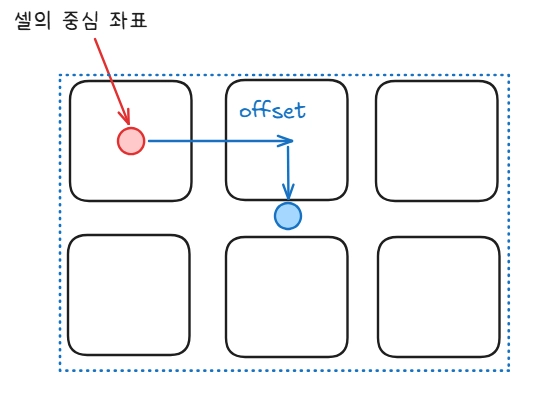
그래서 offset으로 첫 칸 중심에서 영역 한가운데까지 옮겨준다. 가로 w칸이면 중심까지의 거리는 (w-1)/2칸이고, 여기에 CellSize를 곱해 월드 거리로 환산한다(세로도 동일).
마지막으로 facing을 forward로 삼아 LookRotation으로 회전 값을 구한다. 이 회전이 앞서 본 "한 벌의 에셋으로 양방향 대응"을 완성하는 부분으로, 3x2 프리팹을 2x3 영역에 맞춰 실제로 90° 돌려놓는다. 구한 좌표(center)와 회전(rot)으로 건물을 생성한다.
■ 전체 코드
using System.Collections.Generic;
using UnityEngine;

[RequireComponent(typeof(CityGenerator))]
public class CityBuilder : MonoBehaviour
{
    private CityAssetLoader _assetLoader;
    private bool[,] _isVisited;
    private System.Random _rng;

    public void GenerateBuilding(CityLayout layout)
    {
        DestroyBuilding();

        _assetLoader ??= new CityAssetLoader();
        _rng = new System.Random(layout.Seed);
        var footPrints = BuildFootPrints(layout);

        foreach (var bData in footPrints)
        {
            var obj = _assetLoader.GetRandom(bData.Type, bData.Size, _rng);
            if(obj == null) continue;

            var w = bData.Size.x;
            var h = bData.Size.y;

            var originWorld = layout.ConvertCellPosToWorld(bData.Origin.x, bData.Origin.y);
            var offset = new Vector3((w - 1) * 0.5f * layout.CellSize,
                obj.transform.position.y,
                (h - 1) * 0.5f * layout.CellSize);

            var center = originWorld + offset;
            var facing = bData.Facing ?? Vector2Int.up;
            var rot = Quaternion.LookRotation(new Vector3(facing.x, 0, facing.y));

            Instantiate(obj, center, rot, transform);
        }
    }

    public void DestroyBuilding()
    {
        if (transform.childCount == 0) return;

        for (var i = transform.childCount - 1; i >= 0; i--)
        {
            DestroyImmediate(transform.GetChild(i).gameObject);
        }
    }

    private List<BData> BuildFootPrints(CityLayout layout)
    {
        var result = new List<BData>();
        _isVisited = new bool[layout.Width, layout.Height];

        for (var x = 0; x < layout.Width; x++)
        {
            for (var y = 0; y < layout.Height; y++)
            {
                if(_isVisited[x, y]) continue;

                var type = layout.Cells[x, y];
                if(type is ECellType.Road or ECellType.Empty) continue;

                var facing = layout.NearRoadDirection(x, y, _rng);
                var size = CalculateBuildingSize(x, y, facing, layout);

                if(size == Vector2Int.zero) continue;

                result.Add(new BData(new Vector2Int(x, y), size, type, facing));
            }
        }

        return result;
    }

    private Vector2Int CalculateBuildingSize(int x, int y, Vector2Int? facing, CityLayout layout)
    {
        var curType = layout.Cells[x, y];
        var wantVertical = (facing != null && facing.Value.x != 0);

        var candidateSizes = _assetLoader.GetPossibleSize(curType);
        var possibleSize = new List<Vector2Int>();

        foreach (var size in candidateSizes)
        {
            var oriented = OrientSize(size, wantVertical);
            if (IsFit(x, y, oriented, curType, layout))
            {
                possibleSize.Add(oriented);
            }
        }

        if (possibleSize.Count == 0)
        {
            _isVisited[x, y] = true;
            return Vector2Int.zero;
        }

        var chosen = possibleSize[_rng.Next(possibleSize.Count)];

        for (var dx = 0; dx < chosen.x; ++dx)
        {
            for (var dy = 0; dy < chosen.y; ++dy)
            {
                _isVisited[x + dx, y + dy] = true;
            }
        }

        return chosen;
    }

    private Vector2Int OrientSize(Vector2Int size, bool wantVertical)
    {
        if (size.x == size.y) return size;
        var isVertical = size.y > size.x;

        return isVertical == wantVertical ? size : new Vector2Int(size.y, size.x);
    }

    private bool IsFit(int x, int y, Vector2Int size, ECellType curType, CityLayout layout)
    {
        for (var dx = 0; dx < size.x; ++dx)
        {
            for (var dy = 0; dy < size.y; ++dy)
            {
                var cx = x + dx;
                var cy = y + dy;

                if (cx >= layout.Width || cy >= layout.Height || cx < 0 || cy < 0) return false;
                if (layout.Cells[cx, cy] != curType) return false;
                if (_isVisited[cx, cy]) return false;
            }
        }

        return true;
    }
}

public class BData
{
    public Vector2Int Origin;
    public Vector2Int Size;
    public ECellType Type;
    public Vector2Int? Facing;

    public BData(Vector2Int origin, Vector2Int size, ECellType type, Vector2Int? facing)
    {
        Origin = origin;
        Size = size;
        Type = type;
        Facing = facing;
    }
}
'Unity,C# > 절차적생성(PCG)' 카테고리의 다른 글
| 3. 절차적 도심 생성 - Perlin Noise로 경계면 다듬기 (0) | 2026.06.23 |
|---|---|
| 2. 절차적 도심 생성 - 가중치 Voronoi를 통한 구역 분할 (0) | 2026.06.23 |
| 1. 절차적 도심 생성 - 도로 생성 (0) | 2026.06.23 |
| [C#, Unity, 절차적 생성] 절차적 던전 생성 - 5. 벽 생성 (0) | 2025.05.22 |
| [C#, Unity, 절차적 생성] 절차적 던전 생성 - 4. 복도 생성 (1) | 2025.05.21 |